Skip to content
Future Transport Workshop
Part I: Hydrogen Fuel-Cell Transport
A. Energy from Gas Production
B. Generating Hydrogen
C. Harnessing Hydrogen
Part II: Drone Transport
A. Drone Simulator
B. TELLO Setup and Manual Flight
C. Flight Programming
D. Controlling Flight
E. Flight Challenges
*Drone Troubleshooting*
Previous Lesson
*Drone Troubleshooting*
Future Transport Workshop
*Drone Troubleshooting*
Troubleshooting Steps
Please follow these steps if you are struggling to get your drones to work:
Remove and reinsert the battery.
First time flying? Connect to the Tello App to register and unlock the drone.
Using a phone? Turn off the data and place your phone in airplane mode.
Close all apps, then reopen and reconnect to the drone
Move to a larger location.
Make sure you are not near an air vent or it is not too windy outside.
Update firmware on the Tello App.
Use this link
to watch a video on how to update the firmware.
Use
this link
to view the Tello Manual.
Troubleshooting Videos and More
Battery Troubleshooting
Propeller Troubleshooting
Environmental Troubleshooting
Tello App Troubleshooting
Drone Blocks App Troubleshooting
Recalibrating Drone
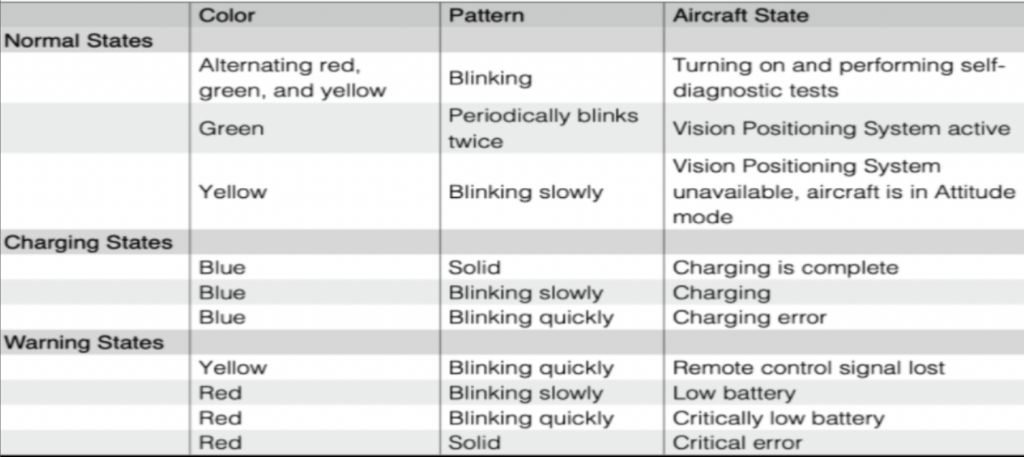
LED Light Color Status
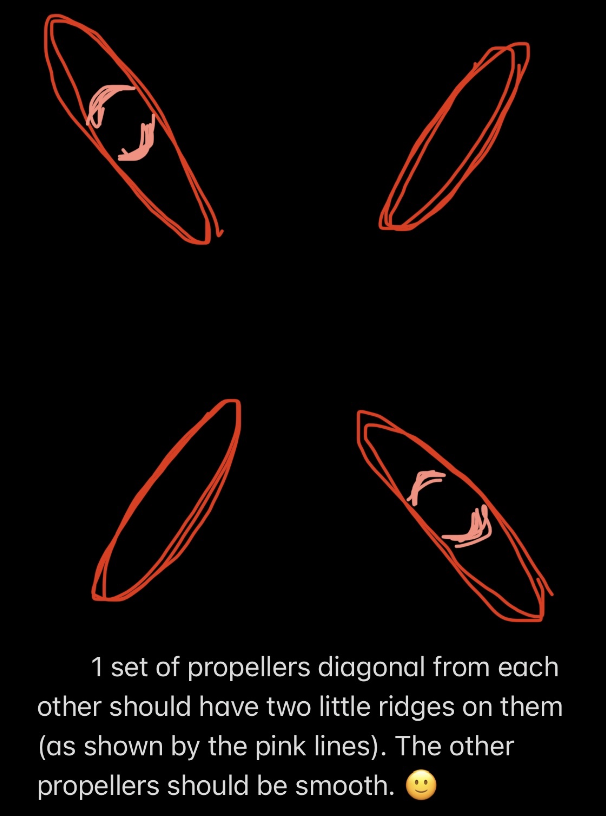
Propeller Position Guide
Previous Lesson
Back to Workshop