Drone Mission Systems: Search & Rescue Challenge :: January 31, 2026
Scan to access this page

Step 1: Getting Started
Check out the video below:
Group Discussion:
What other ways can drones be used?
APEX Drone Pilot Program: Take to the Skies! 🚁
Your Mission: To quickly set up and then manually fly your APEX drone, focusing on flight challenges and understanding its capabilities.
Learning Goals:
- You’ll learn to safely operate your APEX drone.
- You’ll practice key flight maneuvers like hovering, turning (yaw), and directional flight.
- You’ll explore features like Headless Mode and different speeds.
- You’ll connect your drone flying experience to real-world STEM applications and potential careers.
Materials You’ll Need:
- APEX Drone and its controller
- Two (2) AAA batteries for the controller
- Your Smartphone (iOS or Android)
- A safe, open space to fly
- User Guide: EchoDrone User Guide
- Drone App:
- iOS: “TSpeed-7” – https://apps.apple.com/in/app/tspeed-7/id1575505851
- Android: Drone App – https://play.google.com/store/apps/details?id=com.apex.at149&hl=en_SG&pli=1
Ready to fly?
Make sure your drone battery is fully charged and slide it onto the drone body. Place the drone on a flat, level surface.
Drone Obstacle Challenge: Design & Flight Prep!
Your Goal Today:
- Collaboratively design a safe and fun drone obstacle course using classroom items.
- Practice precise drone maneuvers that will help you conquer your course.
Materials You’ll Need:
- Your APEX Drone & Controller (charged and paired)
- Hula hoops
- Classroom furniture/items (chairs, tables, cones, books, tape – anything safe to use as an obstacle or marker)
- Paper and pencils/markers (for sketching your course)
- An open area for initial practice drills
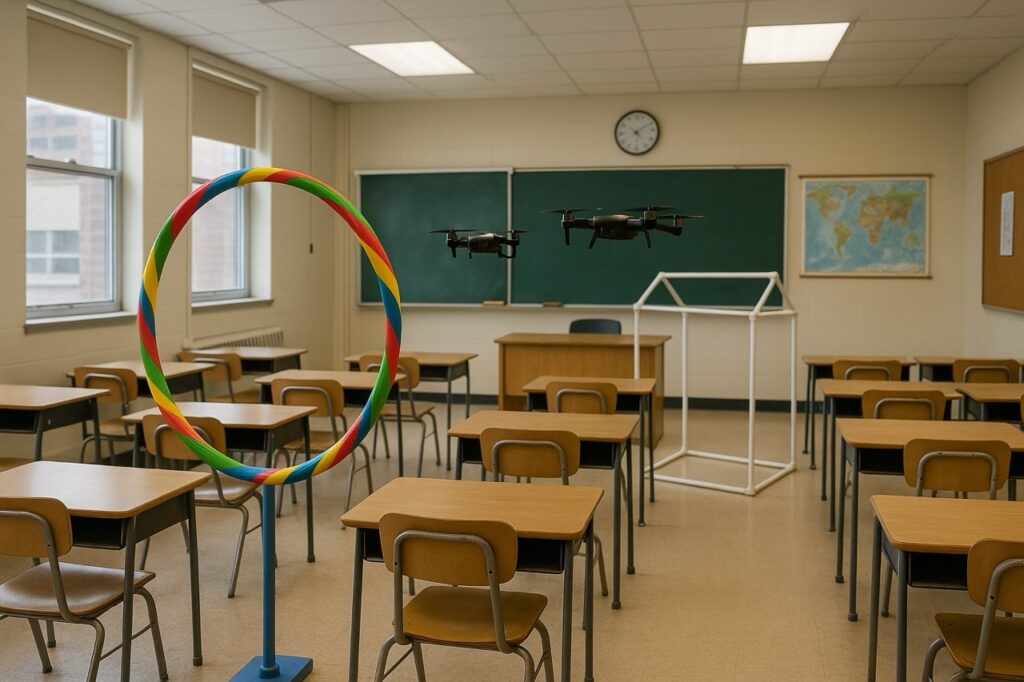
Part 1: Brainstorm & Design Your Drone Playground!
1. Safety Zone Chat
Before we even think about building, let’s talk safety for flying around obstacles:
- Clear Communication: We’ll need signals like “Drone in course!” or “Pilot ready!”
- One at a Time: Only one drone flies the course at a time.
- Eyes on the Drone: Always keep your drone in sight.
- Crash Plan: If you lose control or are about to crash, throttle down (left stick all the way down) immediately!
- No-Fly Zones: We’ll designate areas where drones should not fly (e.g., near people waiting their turn).
2. Course Design Challenge
Get creative! As a team or class, let’s think about what makes a great drone obstacle course:
- What to Use: How can we use hula hoops (vertically, horizontally?), chairs (fly under, over, around?), tables, or even tape lines on the floor?
- Skill Test: Think about including sections that test:
- Flying through hoops (precision!)
- Flying under tables (altitude control!)
- Making sharp turns around chair legs (yaw and roll mastery!)
- Landing on a target (gentle touch!)
- Start Simple, Add Wow: Maybe your course has an “easy path” and a “challenge path.”
- Flow is Key: Make sure there’s a clear start, finish, and path to follow.
3. Sketch Your Flight Path!
- On paper, draw a map of your proposed obstacle course.
- Label the obstacles and show the intended flight path(s).
- Discuss: Is it safe? Is it challenging? Is it fun? Make adjustments as a team.
Part 2: Sharpen Your Piloting Skills! (Practice in an Open Area)
Before setting up the full course, let’s practice some key moves in a clear space. These will be essential for navigating your awesome designs!
1. Control Check-In:
- Which joystick controls your altitude (up/down)? (Left stick, up/down)
- Which controls yaw (rotating left/right)? (Left stick, left/right)
- Which controls pitch (forward/backward)? (Right stick, up/down)
- Which controls roll (sliding left/right)? (Right stick, left/right) Remember: Small, gentle stick movements are key for precision!
2. Practice Drills:
- Hoop Pass Warm-up:
- Have someone safely hold a hula hoop vertically. Practice slowly flying your drone through the hoop. Focus on steady altitude and precise forward movement. Try it from different angles if you can!
- If possible, lay a hula hoop flat on the ground and practice taking off, hovering above it, and then landing gently inside or beside it.
- Altitude Hold & Weave:
- Practice flying to the height of a tabletop and holding it steady. Then, fly to the height of a chair seat and hold.
- Set up 2-3 “markers” (like books or cones) a few feet apart in a line. Practice weaving the drone around them in a slalom pattern, using smooth roll and yaw controls.
- Precision Rotations (Yaw Practice):
- In an open spot, practice making your drone do slow, controlled 90-degree and 180-degree turns using only the yaw control (left stick, left/right), trying to keep it in the same spot.
Next Up:
Once your course design is approved and you’ve honed your skills, it’s time to set up your classroom obstacle course and get ready for the first flight attempts! Good luck, pilots!
Help with installing your propellers

Want more support? Check out the video below.
Mission: Catalina Code Recovery – Phase 1: First Sighting 🎯
The Scenario: Urgent news! A research drone has crashed on an unstable crater wall on Catalina Island. Before its main power failed, its e-ink screen froze, displaying a binary code message – our first vital clue! The section of the crater wall with this first code is in a known zone, and you can see the general area from your launch point.

Your Objective:
- From your designated launch area, pilot your drone towards the crater wall where the first binary code is displayed.
- Even though you might see the target with your own eyes, your primary goal is to practice steady flight and clear visual acquisition through your drone’s camera.
- Use the live video feed in the TSpeed7 app to get a stable, readable view of the binary code. You can either write down the code or capture a clear photo/screenshot through the app.
- Practice smooth maneuvers and controlled hovering to ensure the code is legible in your video feed.
- Safely return your drone to the launch point.
Challenge Advisory: Remember, that crater wall is fragile! Unsteady flight or prolonged hovering too close could kick up dust or disturb the area, making the code difficult to read on your screen. Focus on precise control and interpreting your drone’s video feed.
Need a refresher on binary? Check out the resource video provided!
Mission: Catalina Code Recovery – Phase 2: Blind Data Retrieval 🕶️
The Scenario: Excellent work on deciphering the first code, pilots! Intel now indicates a second, even more critical binary code has been discovered on a different, remote section of the Catalina crater wall. This time, the target area is not directly visible from your piloting station.
Your Objective:
- Your drone must launch from a starting location where you cannot see the target wall with your own eyes (e.g., operate from an adjacent room, with a screen blocking your view, or with your back turned to the target area).
- This is a First-Person View (FPV) only challenge! You must rely entirely on your drone’s live video feed through the Echo app for navigation and spotting. No peeking allowed!
- Using only the drone’s camera, navigate to find the new binary code on the designated crater wall section.
- Once located, capture a clear screenshot or a short, stable video of this second code.
- Safely navigate your drone back to its launch point using FPV only.
Critical Challenge: The crater surface remains unstable. Flying “blind” using only your drone’s camera demands significant patience, smooth control, and clear communication with your team (if you have a co-pilot or spotter managing the video feed). Trust your drone’s perspective!
Precision maneuvering, teamwork, and trusting your FPV skills are your best tools for this advanced challenge. Good luck, pilots!
Post your discovery: Once you’ve successfully captured images of both binary codes, use the website below to decode them. Upload the final message using the QR code provided. In the “Subject” area, include your first name and/or your team members’ names.